
What if the most impressive voice feature on a massage chair is the one you barely notice? Voice activated massage chair features can make it easier to start a programme or adjust a setting without reaching for a remote, but the available commands vary between models. A hands-free label alone doesn’t tell you how well the feature will fit into your routine.
If you’re unsure whether voice control works without an app or remote, or how dependable it is, those are sensible questions to ask. This guide explains what spoken commands may do, where they can have limits, and how to compare them with remote and app controls before choosing a chair.
We’ll cover practical points to check, including supported commands, language, connectivity and privacy. You’ll also learn what to ask about reliability and whether a chair needs an internet connection or another control to get started. The massage itself, the chair’s fit and its ease of use still matter most. Where possible, try the controls during a showroom demonstration and see how naturally they work for you.
Key Takeaways
- Learn how voice commands, voice assistants and spoken prompts differ, so you can tell what a chair’s advertised controls actually mean.
- Compare voice activated massage chair features with remote and app operation for everyday convenience, precision, setup and backup use.
- Use a practical checklist to identify the controls you want and confirm details against the exact chair model specifications.
- Try the chair’s comfort and control layout in person, and ask staff to demonstrate voice features only on models confirmed to include them.
Voice-Activated Massage Chair Features: What They Do and Who They Help
Voice activation lets you operate supported massage chair functions using spoken commands. The key word is supported: one chair may respond to a small set of preset phrases, while another may offer different controls. As a useful rule of thumb, voice activation means speaking to control selected chair functions, and the available commands vary by model. Check the specifications for the exact model rather than assuming the feature works the same way across chairs.
What can voice control do on a massage chair?
Depending on the model, you might be able to ask the chair to start, pause or change a massage programme. Treat these as examples to verify, not a standard command list. Some functions may be limited to the chair itself, while audio controls or a connected external assistant may be managed separately.
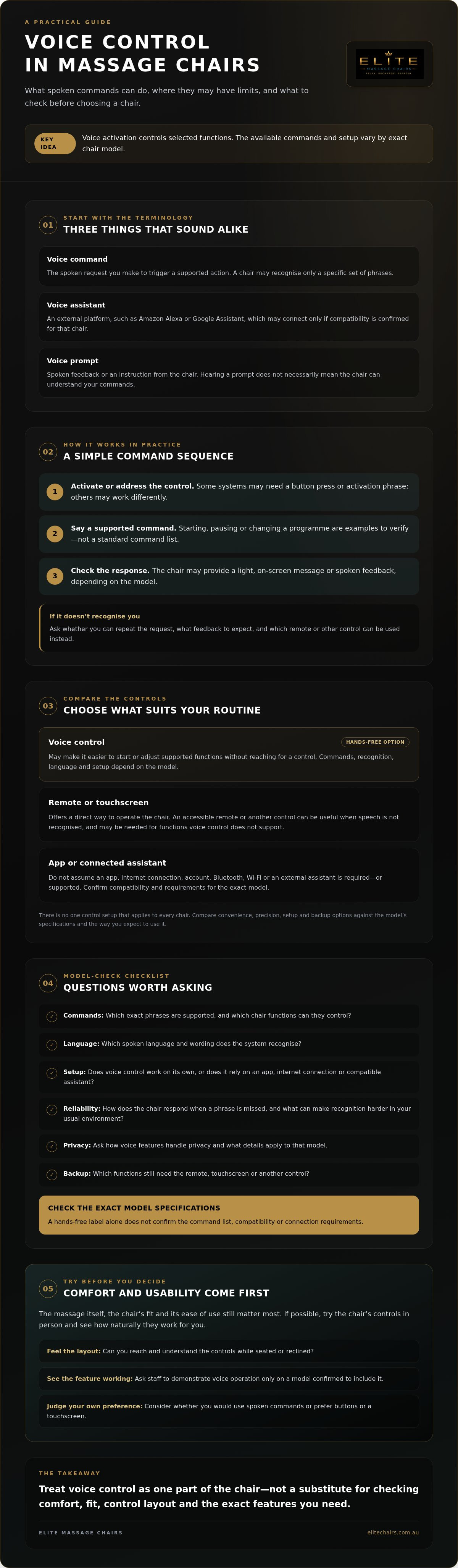
The terms can sound similar, but they describe different things. A voice command is what you say to request an action. A voice assistant is an external platform, such as Amazon Alexa or Google Assistant, which may connect with a chair if the manufacturer confirms compatibility. A voice prompt is spoken feedback or an instruction from the chair. Hearing one doesn’t necessarily mean the chair can understand your commands. Technology for interpreting spoken language is broadly related to natural language processing, but don’t assume every chair uses the same system or supports open-ended speech.
Who may find hands-free controls useful?
Hands-free operation may suit someone who prefers fewer steps when starting or adjusting a session, especially while already reclined. Instead of leaning forward to reach a control, they may be able to use a supported phrase, if the chair is designed to respond in that situation.
Ease of use depends on more than the promise of voice control. Commands need to be clear, recognition needs to work reliably in your usual environment, and an accessible remote or other backup control can be useful if speech isn’t recognised. Ask whether the feature works independently or relies on an app, internet connection or compatible assistant. Confirm the supported language and exact phrases for the model you’re considering.
Voice activated massage chair features aren’t essential for every shopper. If you’re comparing chairs, consider whether you’d genuinely use spoken controls or prefer the direct feel of buttons or a touchscreen. A showroom demonstration can help you judge the controls in practice. Ask staff to demonstrate voice operation only on a model confirmed to include it.
How Voice-Activated Massage Chair Controls Work in Practice
Voice control usually follows a simple sequence: activate or address the control, say a supported command, then check that the chair has responded. The exact process depends on the model. Some systems may need a button press or activation phrase before listening; others may work differently. Don’t assume a phrase that works with one chair will work with another.
From spoken command to chair response
After hearing a request, the system interprets it and, if it recognises a supported command, signals the relevant chair function. A light, on-screen message or spoken prompt may show that the command registered, but not every model provides the same feedback. Ask what happens if the chair doesn’t recognise a request, and whether you can repeat it or use another control.
Recognition can depend on practical details. If a chair uses a built-in microphone, its placement may affect how clearly it picks up your voice. Background conversation, television or other noise can also make commands harder to recognise. Wording matters too, so check the manufacturer’s instructions for the exact phrases and supported language instead of relying on conversational guesses.
Voice control, remotes and connected assistants
Built-in voice recognition and an external voice assistant aren’t the same setup. A chair may recognise a limited set of commands itself, while another system may rely on a connected platform such as Amazon Alexa or Google Assistant. These are examples to check, not confirmed compatibility for any particular chair sold by Elite Massage Chairs.
Likewise, don’t assume that voice control needs Bluetooth, Wi-Fi, a smartphone app, internet access or an account. Setup and connectivity requirements are model-specific. Before choosing, ask the seller or manufacturer to confirm what is required, whether voice commands work without an app or internet connection, and which chair functions can be controlled. A remote or touchscreen may still be needed for settings that voice operation doesn’t support.
The Mayo Clinic Health System describes the physical and mental benefits of massage; voice control itself is an operating feature, not a health outcome. To get a clearer sense of day-to-day usability, compare the control options and instructions during a massage chair showroom demonstration. Ask staff to demonstrate voice operation only on a model confirmed to include it, and note any setup steps you’d need to repeat at home.
Voice Control vs Remote and App: Which Massage Chair Features Matter?
Voice, remote and app controls each suit different habits. A chair may include one option, several or none, so check the specifications for the exact model rather than assuming a particular control comes as standard. Compare how you’ll use the chair day to day, not just how many controls appear on the feature list.
| Control | Convenience | Precision | Setup | Fallback use |
|---|---|---|---|---|
| Voice | Hands-free for supported adjustments | Depends on recognised commands | May need activation or other setup | Check whether another control is included |
| Remote | Ready to hand, but requires reaching | Direct buttons can make selections clear | Check the control layout and instructions | Useful if voice or app control isn’t available |
| App | Can be convenient if your phone is nearby | May offer on-screen selections | Check phone, connection and account requirements | Ask whether core functions work without it |
Useful controls depend on reliable operation and accessible alternatives, not on choosing one control type as universally best. The voice activated massage chair features that matter most are the ones you can use comfortably and consistently.
When voice control may be the more convenient option
If you often want to adjust a session without reaching for a control, supported voice commands may feel simpler. But a noisy room or misunderstood phrase can interrupt that ease. Check whether the instructions explain what to say, how the chair signals a recognised command, and how to repeat it. Try the controls in conditions that resemble your usual routine.
When a remote or app may suit you better
Physical buttons offer a direct way to select a clearly labelled function, while an app may present settings on a screen. Either can suit your preferences, but confirm what remains usable if your phone isn’t nearby, a connection is unavailable or a spoken command doesn’t register. Ask which control operates essential functions and whether alternatives are included with that model.
For a broader way to weigh controls alongside comfort and other chair features, explore this massage chair buying guide. Keep your own routine in mind as you compare: the most sophisticated option isn’t necessarily the easiest one for you.
How to Assess Voice-Activated Massage Chair Features Before Buying
Voice control can sound appealing on a feature list, but its value depends on whether it makes tasks you actually do easier. Rather than judging it as either a must-have or a novelty, assess the commands you’d use, how consistently they work and what you can do if they don’t. Request specifications for the exact model: a general description of a chair range doesn’t confirm that every model has the same features.
Questions to ask about a specific chair
- 1. Identify the controls you want. Decide whether you’d use voice to start, pause or adjust a session, and ask which of those functions the model supports.
- 2. Confirm the command list. Is it documented, and are commands limited to preset wording? Check which languages are supported.
- 3. Check setup and compatibility. Ask whether voice control is built in or depends on a smartphone app, account, internet connection or external assistant. Confirm any platform compatibility with the manufacturer.
- 4. Check the alternatives. Find out whether manual controls still operate if voice recognition, a phone or a connection is unavailable, and which functions remain accessible.
- 5. Ask about privacy. Direct questions to the manufacturer: where is the microphone, when is it active, what voice data, if any, is collected, and what permissions or connectivity are required? Don’t rely on broad privacy claims without model-specific information.
How to test voice features for comfort and reliability
In a demonstration, try the documented commands in a quiet setting, then repeat them to see whether the response feels consistent. Notice how the chair indicates that it heard you, and whether you can follow the instructions without memorising awkward phrases. If possible, check how straightforward it is to use a manual control as a fallback. One successful command may be encouraging, but it doesn’t tell you whether the feature will suit your regular routine.
This practical test helps answer the novelty question: if voice control handles a task you’d otherwise interrupt your session to perform, and it does so dependably, it may earn its place. If you prefer buttons or don’t expect to use spoken commands, prioritise the controls that feel natural to you. For more tips on assessing a chair in person, read the massage chair demonstration guide.
Want to try the controls in person? Book a free showroom demonstration, and ask staff to show voice operation only on a model confirmed to include it.
Experience Massage Chair Features Before You Choose
A showroom demonstration gives you a chance to judge more than a feature list. You can feel how the chair fits, see where the controls sit and follow the operating instructions before deciding whether they feel intuitive. For voice control, ask staff to demonstrate it only on a specific model confirmed to include the feature. The availability of a demonstration doesn’t mean every chair offers voice activation.
What to test during a massage chair demonstration
Start by confirming the exact model and asking which controls it supports. If voice activation is verified for that chair, request its command instructions and follow the supplied setup steps. Try the spoken commands alongside the remote or app controls, if those options are available, and notice whether switching between them feels straightforward.
Pay attention to your experience as well as the technology. Is the chair comfortable in the positions you’re likely to use? Can you reach and understand the controls without strain? Do the instructions make sense, and can you adjust the session in a way that feels natural? These details help you assess whether a control feature will be useful in your routine, rather than simply impressive during a brief demonstration.
Elite Massage Chairs is an Australian retailer of premium massage chairs, with online retail and free showroom demonstrations available. Staff can help you compare chairs, but ask them to verify voice functionality for the particular model you’re considering instead of relying on a general category description.
Choose with confidence, not on features alone
Voice activated massage chair features can be a helpful convenience, but weigh them alongside comfort, fit, programmes and the other functions that matter to you. A chair that feels right and is easy to operate may suit you better than one with extra controls you’re unlikely to use. If you’re comparing zero-gravity positioning and related chair considerations, explore this zero gravity massage chair guide.
Ready to assess the controls for yourself? Book a free massage chair demonstration and ask which current models, if any, have verified voice features. You can compare the chair’s feel and controls at a relaxed pace, then decide what belongs on your shortlist.
Choose Controls That Feel Natural to You
The best voice activated massage chair features are the ones that make your routine easier, not simply the ones that sound most advanced. Check the exact model’s supported commands, setup requirements and compatibility, then compare voice operation with its remote or app controls. Comfort, fit and straightforward operation should carry just as much weight as hands-free convenience.
A demonstration can help you see how the chair responds and decide whether its controls feel intuitive. Ask staff to show voice functions only on models confirmed to include them, and consider what alternatives are available if a command isn’t recognised.
Elite Massage Chairs sells premium massage chairs and wellness accessories, and free showroom demonstrations are available. Book a free showroom demonstration and experience the available chair controls. Take your questions, try the features at your own pace and choose with confidence.
Frequently Asked Questions
What features can a voice-activated massage chair control?
A voice-activated massage chair can operate only the functions its manufacturer has enabled for spoken control. Depending on the specific model, examples might include starting, pausing or changing a programme, but these aren’t standard across all chairs. Check the model’s command list to see what’s supported, and distinguish chair controls from audio features or commands handled by a connected voice assistant.
Can a massage chair respond to voice commands without a remote?
Sometimes, but it depends on how the chair’s voice system is designed. Voice operation may work independently, or the chair may require an activation button, remote, app or other setup before it listens. Ask the manufacturer whether the exact model can start and respond to commands without its remote, and which functions, if any, still require manual controls.
Do voice-activated massage chairs work with Amazon Alexa or Google Assistant?
Some models may connect with an external assistant, but don’t assume Amazon Alexa or Google Assistant compatibility from a general voice-control claim. A chair may instead use built-in voice recognition with its own set of commands. Confirm the exact model’s supported platforms, setup steps and connectivity requirements with the manufacturer before relying on an assistant for chair operation.
Is voice control on a massage chair reliable in a noisy room?
Background noise may make spoken commands harder for a chair to recognise, though performance depends on the model and its operating conditions. Check the manufacturer’s instructions and, if possible, test the commands in a quiet setting before trying a noisier environment. Notice whether the chair confirms a recognised request and whether you can easily repeat it or switch to a remote or other manual control.
Can I use a massage chair app and voice control together?
That depends on the chair. Some models may offer both options, while others may provide just one or neither. Confirm whether the app and voice functions are compatible and can be used during the same session, or whether setup or connectivity affects either control. Also ask which essential adjustments remain available if your phone, connection or voice command isn’t accessible.
How do I check whether a massage chair has voice activation?
Check the specifications for the exact model, then ask the seller or manufacturer for its documented command list and setup requirements. Verify supported languages, any app or assistant compatibility, and whether a remote or internet connection is needed. Treat broad descriptions of a chair range as unconfirmed until the feature is stated for the particular model. A demonstration can help you see it in operation.
Is a voice-activated massage chair worth considering?
It may be worth considering if hands-free adjustments would make your usual routine simpler and the supported commands work reliably for you. Voice activated massage chair features shouldn’t outweigh comfort, fit, programmes or controls you’ll use more often. Compare voice operation with the remote or app, and make sure there’s a practical alternative if speech isn’t recognised. The right choice depends on your preferences.